You can put subscription renewals on your iPhone Calendar in two ways: create a repeating event for each service yourself, or let a tracker create those events for you. Either way, the goal is the same. A renewal should show up in the place you already plan your week, early enough that you still have time to keep, downgrade, or cancel.
Why the Calendar works better than a separate list
Most people check their calendar several times a day. Few people open a subscription list unless something has already gone wrong. Putting the renewal where you look anyway turns it from something you have to remember into something you simply see.
It also helps with context. A $99 annual renewal the same week as a car service and a school trip reads differently from the same number on its own. The calendar shows you the month the charge will land in, not just the charge.
Manual method: a repeating event per service
This works with nothing but the built-in Calendar app.
- Find the real renewal date. Check the provider’s account page or your last receipt. For Apple-billed subscriptions, the renewal date is listed in the Subscriptions section of your Apple Account.
- Create an all-day event on that date. Use a title you will recognise at a glance, such as “Cloud storage renews — $2.99”. Putting the amount in the title means you see it without opening the event.
- Set the repeat to match the billing cycle. Monthly, yearly, or a custom interval for quarterly plans.
- Add an alert. Choose one that fires early enough to act on, not on the day itself.
- Use the notes field. Record the plan name, how it is billed (Apple, the provider, or a payment wallet), and where to cancel. That is the information you will want in a hurry.
Two things to watch. First, if a plan renews on the 29th, 30th, or 31st, check how the provider handles shorter months; a repeating event may not fall on the same day the provider bills. Second, a manual event does not know when the price changes or when you cancel. Every change means editing the event by hand, and that upkeep is where most manual calendars drift out of date.
Faster method: per-item Calendar sync in Cadora
Cadora can create and maintain those events for the subscriptions and bills you track in it.
- Add an item with its name, price, billing cycle, and next renewal date.
- In the item’s alerts section, turn on Add to Calendar.
- Allow Calendar access when iOS asks.
Cadora then creates one all-day repeating event on your default calendar, titled with the item’s name and “renews”, with the amount in the notes and, when the item has one, a link to the provider’s cancellation page. When you edit the item, the event follows. When you pause, cancel, or delete it, Cadora removes the event.
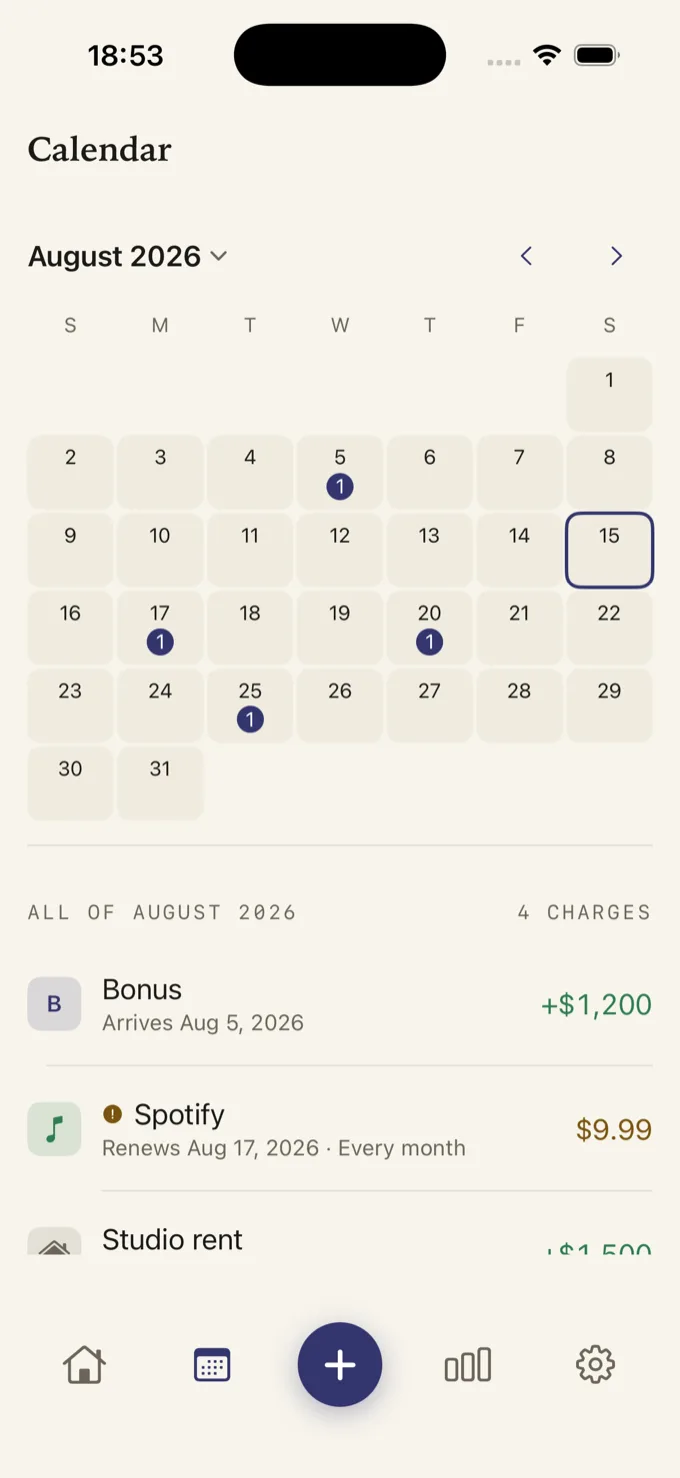
A few details are worth knowing before you turn it on:
- It uses your default calendar. If your default calendar is shared with a partner or family, they will see your renewal events too. You can check or change the default calendar in the Calendar section of iOS Settings.
- The alert comes from Cadora, not the event. The calendar event carries no alarm of its own, so you do not get two notifications for one renewal. Cadora schedules a local reminder instead, three days before by default, and you can change the lead time per item.
- It only touches its own events. iOS asks for full Calendar access, because an app has to read events to update the ones it created. Cadora keeps a record of the events it made and looks up only those.
- It is included in the free version. Premium adds more than one reminder per item, which is useful for annual plans and free trials.
Choose reminder timing deliberately
A reminder on renewal day is a receipt, not a warning. Pick a lead time that leaves room to compare options and act:
| Item | Suggested lead time | Why |
|---|---|---|
| Monthly subscription | 3–7 days | Enough time to decide whether this month is worth it |
| Annual subscription | 14–30 days | Time to check the new price and compare alternatives |
| Free trial | Two reminders | One while you can still compare, one shortly before it converts |
| Recurring bill | Before your usual payment day | So the money is where it needs to be |
Some providers require notice before the renewal date, or process cancellations with a delay. Their terms beat any rule of thumb, so check them once and set the reminder accordingly.
Keep the calendar tidy
A calendar full of renewal events can become noise. Two habits keep it useful:
- Only sync what needs a decision. Rent or a phone plan you will never cancel may not need an event. A streaming service you might pause does.
- Remove events when you cancel. A leftover renewal event for a cancelled service teaches you to ignore the calendar. Cadora removes an item’s event as soon as you pause or cancel it; with manual events, delete future occurrences yourself.
Calendar events and reminders are prompts, not guarantees. They cannot confirm that a provider will charge, that a cancellation went through, or that iOS will deliver every notification on time. Keep the confirmation when you cancel and check your next statement.
FAQ
Can I put subscription renewals on my iPhone Calendar?
Yes. Create a repeating all-day event for each renewal in the Calendar app, or use a tracker such as Cadora to create and update those events for the items you track.
Does Cadora read my whole calendar?
iOS grants Calendar access as a whole, but Cadora only looks up the events it created, using a record of their identifiers. It does not read or analyse your other events.
Can I choose which calendar Cadora uses?
Cadora adds events to your default calendar. To send them somewhere else, change the default calendar in iOS Settings before turning on Calendar sync.
Do Apple subscriptions appear in Calendar automatically?
No. Apple lists your Apple-billed subscriptions and their renewal dates in your Apple Account, but it does not add them to Calendar. Subscriptions billed directly by a provider do not appear in that Apple list at all.