What Cadora does
Cadora is a private subscription and bill tracker for iPhone and iPad that helps people track recurring costs, catch renewals, and decide what to cancel. It needs no Cadora account, and records stay on the device and sync only through the user's own iCloud. It keeps subscriptions, bills, memberships, instalments, income, and free trials in one place. You enter the amount, cycle, and date you know. It can schedule local renewal reminders and, with permission, add renewal events it creates to Apple Calendar. It also turns the prices you enter into on-device totals and insights. A Lock Screen widget and Siri (“What’s renewing in Cadora”) show what renews next, with details only once the iPhone is unlocked.
Who it suits
It suits someone who wants to decide what belongs in their list. That may include an annual software licence, a trial you started yesterday, a shared household cost, or a recurring bill that never appears in an app-store subscription list. Manual entry takes a moment, but it also works across Apple billing, direct providers, payment wallets, and anything else you choose to record.
Who may want something else
If your main goal is automatic transaction import or discovering charges from a bank feed, Cadora is not that product. It does not connect to banks, scan email, or claim to know every subscription you have. If you want a service to cancel subscriptions for you, you must use the relevant provider or billing channel instead.
Privacy in plain language
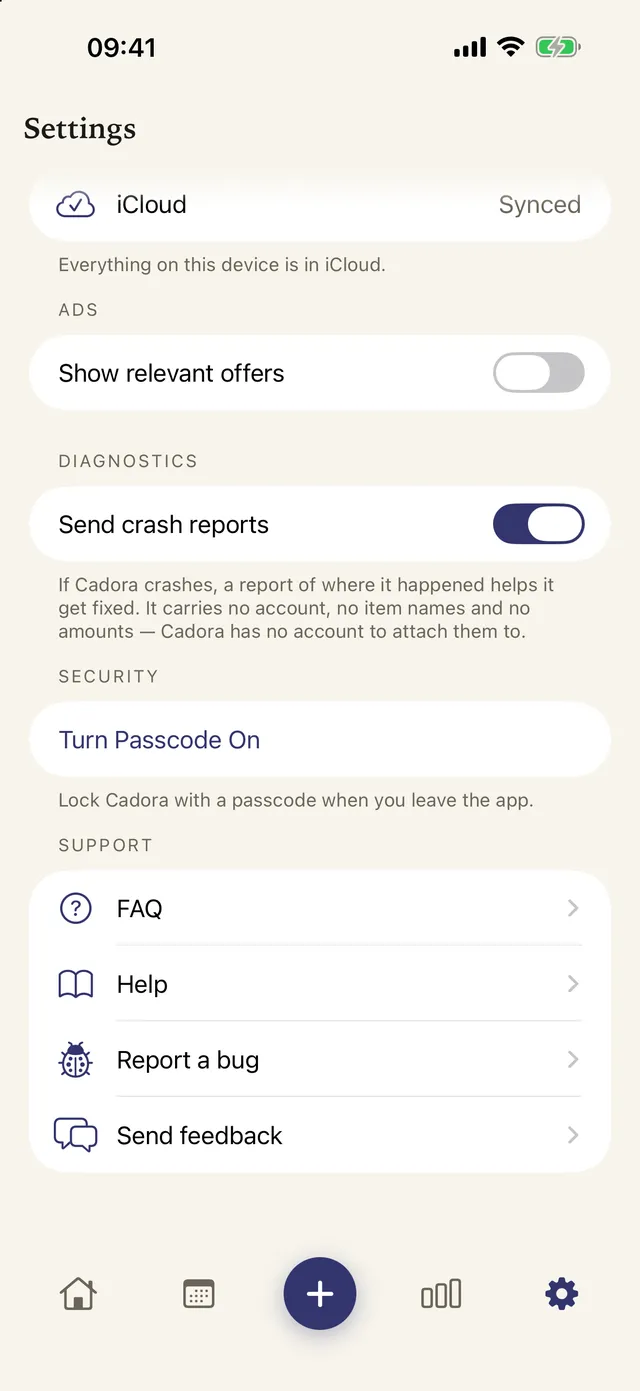
Cadora has no Cadora account, user database or server. Its decision support works on figures you entered, on your device. Here is everything that stays and everything that leaves, as the Privacy Policy sets out:
| What | Where it goes | Your control |
|---|---|---|
| Your items, prices, dates and notes | Your device, and your own iCloud if iCloud is on. The developer holds no copy. | Delete items in the app; delete the synced copy in iCloud settings (below) |
| Ads (free plan) | Google AdMob shows banner ads. Nothing you type reaches an advertiser. | iOS asks before ads may use your advertising identifier, and you can say no. Premium has no ads. |
| Crash reports | Google Firebase Crashlytics, with no item names or amounts. Kept 90 days. | On by default; switch off in Settings → Diagnostics |
| Usage analytics | Google Firebase Analytics, never anything you typed. Kept 2 months. | Off until you say yes |
| Exchange rates | A public rate table, downloaded at most once a day. Nothing about you is sent. | Off by default |
How to delete your data
Deleting an item, or the app, removes it from your device. Deleting the app alone does not remove the copy already in your iCloud. To remove that too, go to iOS Settings → [your name] → iCloud → Manage Account Storage → Cadora.
Before you download
- Platforms: iPhone and iPad running iOS 18 or later.
- Free tier: up to 10 active items; cancelled and paused items remain visible.
- Premium: unlimited active items, multiple reminders, advanced insights and forecast, CSV/PDF export, and no ads.
- Limits: reminders are local iOS notifications; they do not control a provider’s billing or cancellation outcome.
Questions before you download
Is Cadora a bank-connected subscription tracker?
No. Cadora is a manual subscription tracker. It does not require a bank login, connect to a bank account, or scan an email inbox. You add the records you want to track.
What does Cadora track?
Cadora tracks subscriptions, bills, memberships, instalments, income, and free trials. It records the price, billing cycle, renewal date, category, and status that you enter.
Can Cadora cancel subscriptions for me?
No. Cadora can remind you before a date you set, but cancellation must be completed through the provider, Apple, or another billing route.
Khai Do is an independent iOS developer in Vietnam who builds and supports Cadora under Aquifer.