Short answer: before you take a subscription deal, write down three things: the deal price, the day the discount ends, and the regular price that follows. Set a reminder a week before that day. Then the end of the deal becomes a decision, not a surprise on your statement.
Black Friday falls on 27 November in 2026, and the subscription offers start well before it. Most of them are fine. The trouble is the second date, the one that arrives in spring.
Record three things for every deal
- The deal price and how it is billed: $2.99 a month, or $29.99 for the first year.
- The day the discount ends. Offers often say “for six months” or “for the first year”. Turn that into a date on the day you sign up, while the terms are in front of you.
- The price after. Write the regular price as the offer states it. If the offer doesn’t say, check the service’s plan page and screenshot it.
Also note who bills you. A deal taken in an app may be billed through the App Store; a deal taken on a website is billed by the provider. That decides where you go if you want to cancel.
A worked example
Demo values: on 27 November you take a streaming deal at $2.99 a month for six months. After that it renews at the regular $11.99 a month.
| Period | Monthly price | Total |
|---|---|---|
| Months 1–6 (deal) | $2.99 | $17.94 |
| Months 7–12 (regular) | $11.99 | $71.94 |
| First year | $89.88 |
The deal is real: the regular price for a year would be $143.88. But month seven costs four times month six, and it lands around 27 May, when nobody is thinking about Black Friday. A reminder on 20 May gives you a week to decide whether $11.99 is worth it.
Yearly deals work the same way with bigger numbers. An app offered at $29.99 for the first year, against a regular $59.99, renews a year later at $59.99 unless you change it.
Decide before the price changes
When the reminder arrives, treat it like any renewal: would you start this plan today at the regular price? If yes, keep it and update the amount. If not, look for a cheaper tier, pause it, or cancel through whoever bills you. If you cancel, keep the confirmation.
Deals that need a closer look
- Several deals that end in the same month. Five Black Friday offers taken in one weekend can all reset in the same few weeks. Put them on one list so the new monthly total isn’t a surprise.
- Deals that lock in a year. A cheap first year is paid upfront, and the renewal is a full year too.
- Bundles. If a deal bundles two services, check what happens to the price when one part ends or you drop one.
- Cancelling early. Some services keep the deal price until the paid period ends after you cancel; some end the offer straight away. Read the terms before cancelling early.
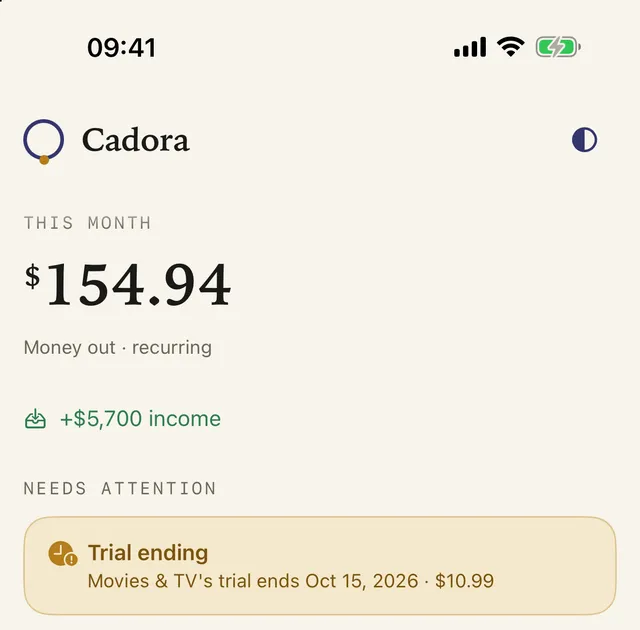
In Cadora, add the subscription at the deal price, and add a reminder-only item for the day the discount ends. When the price changes, update the amount; Cadora keeps the price history. Cadora doesn’t read offer terms or emails, so the dates are the ones you enter.
FAQ
Do Black Friday subscription deals renew at full price?
Many renew automatically at the regular price once the deal period ends, unless you cancel or change the plan. The offer terms say when and at what price, so record both on the day you sign up.
Can I cancel a deal right after signing up?
Often, yes. Some services keep the discounted access until the paid period ends; others end the offer as soon as you cancel. Check the terms first if you want to keep the deal price until it runs out.
Will Cadora remind me when the discount ends?
Yes, if you add the end date and notifications are on. Add a reminder-only item for that date, and Cadora reminds you before it. It can’t see offers you haven’t entered.
Download Cadora on the App Store
Khai Do is an independent iOS developer in Vietnam who builds and supports Cadora under Aquifer.